Radiya: A Handwritten Script Font That Brings Handmade Designs to Life
Designing Candle Labels with Radiya
I was putting together a new line of soy candles, trying to get the labels just right. I wanted something elegant but approachable, something that felt personal yet polished. That’s when I downloaded Radiya. The moment I typed out the scent names—Lavender Fields, Fireside, Citrus Grove—it was like the font added a whisper of warmth and charm to each one. Radiya’s calligraphy-inspired strokes gave the labels a handmade look that felt authentic, not forced.
What Makes Radiya Unique
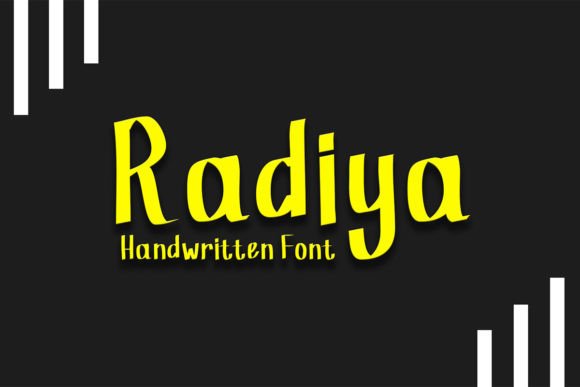
Radiya is a script font created with a calligraphy pen, which means each letter has a flowing, organic shape that mimics real ink on paper. It’s not stiff or overly stylized like some digital scripts. Instead, it feels like someone carefully wrote out each word by hand. This gives Radiya a natural, artisanal vibe that’s perfect for makers and sellers who want to add a personal touch to their products.
What stood out to me was how Radiya balanced elegance and simplicity. It has a soft, romantic mood without being too frilly. The font has a natural bounce and variation in stroke weight that adds visual interest without overwhelming the design. Whether I was using it for a candle label or a wedding invitation, Radiya always felt like it elevated the piece without stealing the spotlight.
Using Radiya Across Handmade Products
I’ve used Radiya in so many ways since discovering it. From greeting cards to boutique tags, this font has become a go-to in my design toolkit. Here are a few of the real-life applications I’ve tested:
- Candle Labels: Perfect for scent names and short descriptions. Radiya’s fluid lines feel soft and inviting, matching the mood of a cozy candle.
- Wedding Invitations: I used it for the couple’s names and event titles. The font added a touch of romance and sophistication without being too formal.
- Printable Wall Art: For a farmhouse-style quote print, Radiya gave the text a warm, hand-lettered look that blended well with rustic illustrations.
- Boutique Tags: Whether for clothing or gift tags, Radiya added a boutique feel that made the items feel more curated and intentional.
- Digital Download Previews: When sharing free printable templates on my blog, I used Radiya to highlight key phrases and headings. It made the design feel more personal and cohesive.
How Radiya Elevates Product Presentation
Typography can make or break a product’s perceived value. Radiya brings a sense of care and craftsmanship to any design, even if it’s just a simple label or tag. When I switched from a basic script to Radiya on my candle packaging, customers started commenting on how “thoughtfully designed” everything looked.
It also helped with brand consistency. Since I use Radiya across multiple product types—digital and physical—it became part of my visual identity. People began recognizing my work by the font alone, which is powerful for a small creative business. Radiya’s unique style made my products feel more intentional and polished, which in turn helped build trust with my audience.
Best Use Cases for Radiya
Radiya shines in short-form text. It’s ideal for:
- Product names
- Labels and tags
- Invitation titles
- Signage and quotes
- Logo lettering
It’s not designed for long paragraphs or body text. Its decorative strokes and variation in line weight make it harder to read in large blocks. But as a display font, it’s perfect. I used it for the title of a printable planner page and paired it with a clean sans serif for the daily headings and notes. The contrast worked beautifully and kept the design easy to navigate.
Readability Tips for Real-World Use
When using Radiya for physical products like stickers or printed cards, I found a few tricks that helped maintain clarity:
- Size Matters: Keep Radiya at a readable size. I avoid using it smaller than 12pt for printed items, especially if they’ll be cut on a Cricut or Silhouette.
- Spacing is Key: Kerning can affect how well the letters flow together. I often adjust the spacing slightly to prevent letters from touching awkwardly, especially in all-caps settings.
- Mockup Testing: Before printing, I always preview the text in a mockup to see how it looks in context. Sometimes the font can feel too delicate on its own but looks perfect once placed on a label or tag.
- Contrast: Pair Radiya with a bold background or a contrasting font to ensure it stands out. I often use it over soft watercolor textures or simple white backgrounds to keep the focus on the text.
Font Pairing with Radiya
One of the joys of using Radiya is how well it pairs with other fonts. I’ve found a few combinations that work beautifully:
- Radiya + Lato: For a modern, clean look, I pair Radiya with Lato, a friendly sans serif. This combo works well for greeting cards and shop banners.
- Radiya + Playfair Display: When I want a more elegant, editorial feel—like for wedding invitations—I pair Radiya with Playfair Display, a classic serif font.
- Radiya + Bebas Neue: If I’m going for a bold, minimalist style—like for tote bag designs—I use Radiya for the main phrase and Bebas Neue for a short tagline underneath.
The key is to balance Radiya’s soft, flowing lines with something more structured or bold. This contrast helps guide the viewer’s eye and keeps the overall design from feeling too busy.
What to Check Before Using Radiya Commercially
Before I started using Radiya in my shop, I made sure to review the font’s licensing terms. Many free fonts come with restrictions on commercial use, especially for physical products or digital templates. Radiya, however, is available with a commercial license that allows me to use it in product designs, printables, and merchandise without legal concerns.
I also checked for alternate characters, ligatures, and swashes to see how much customization I could do. Radiya includes a nice selection of stylistic alternates, which let me tweak the look of certain letters for a more personalized feel. It also supports multiple languages and comes in various file formats—OTF, TTF, WOFF—which made it easy to use across design platforms like Canva, Adobe Illustrator, and Silhouette Studio.